
服务器使用流程
服务器使用流程
Section titled “服务器使用流程”连接计算服务器-> 在计算服务器上配置 docker -> 在计算服务器挂载存储服务器 -> 在 docker 中运行代码
1 操作手册
Section titled “1 操作手册”2 VScode 配置
Section titled “2 VScode 配置”2.1 SSH 配置
Section titled “2.1 SSH 配置”Pycharm 对于实验室设备来说并不好用,踩了很多坑还是换回了 VScode
以 VScode 为例,通过在个人文件路径下设置 config 来完成(需要修改实际地址,用户,以及端口号)
在校外就使用直连完成,如果使用 easy connect 就需要使用跳板机
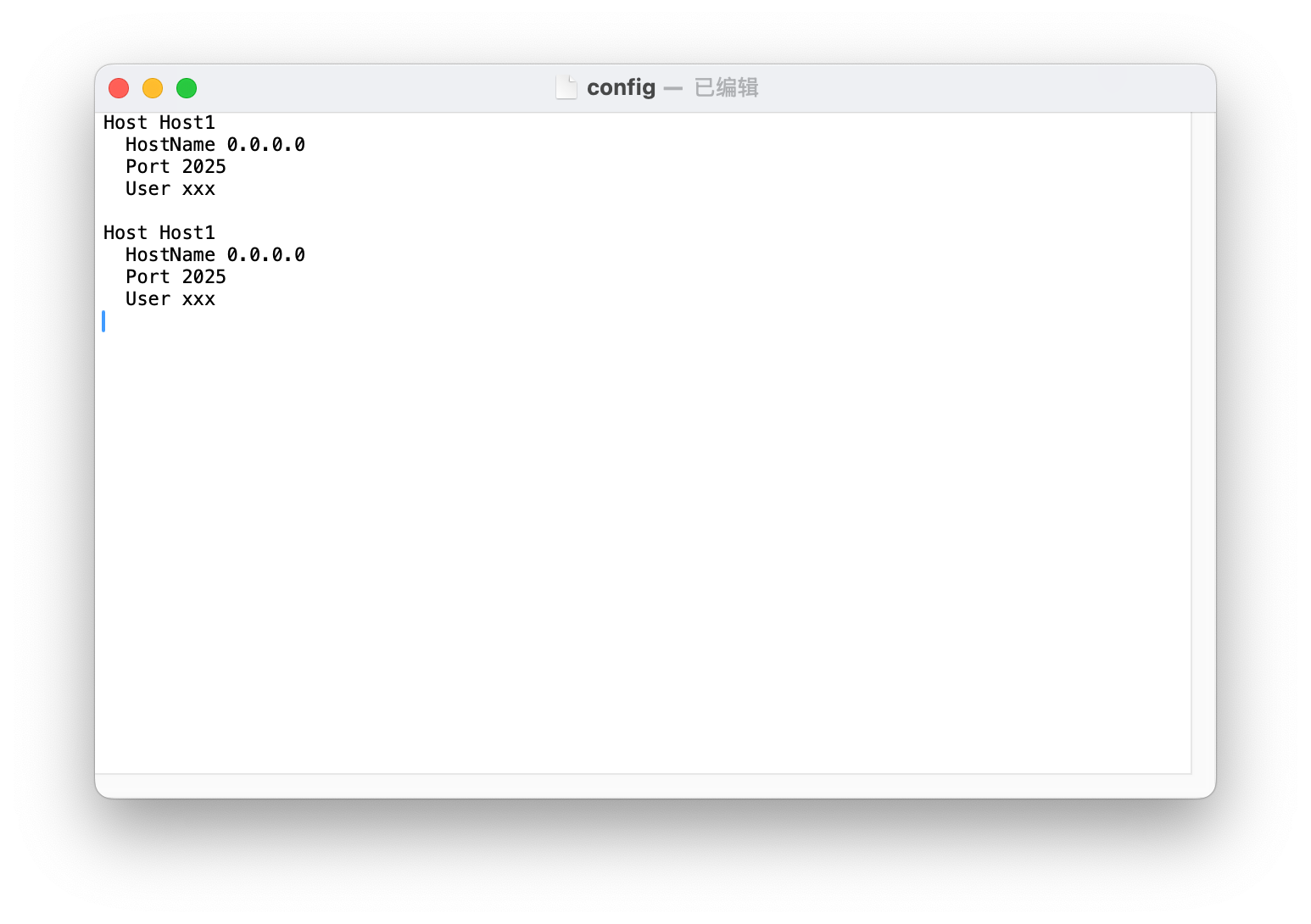
完毕后就可以在终端中快速启动 SSH 服务器的终端
2.2 访问 Docker 内文件
Section titled “2.2 访问 Docker 内文件”如果已经创建了 docker 就需在容器内部启动 SSH 服务,在本机进行远程连接
内层安装包:
apt install openssh-serverapt install openssh-clientapt install nanoapt install tmuxnano /etc/ssh/sshd_config在配置文件中需要修改两个地方
Port 2222 # 防止端口冲突,随便选择一个PermitRootLogin yes # 允许 root 登陆另外需要修改 root 的密码,输入一下指令
passwd配置完毕后,重启 SSH 服务
service ssh restart就可以在本地直接通过 SSH 访问容器内部,注意 ip 是宿主机的 ip(因为启动时候选择了 host 选项)
ssh root@xxx.xxx.xxx.xxx -p 2222有时候会出现问题,是更换 image 产生的
ssh-keygen -R '[192.168.1.244]:2025'3 Docker 导出
Section titled “3 Docker 导出”对于计算服务器,并没有权限直接访问 share 文件夹
可以借助于 docker 服务器中转操作
参考以下命令
docker commit xxx(容器名) yun.nju.edu.cn:5000/xxx(个人用户名)/pytorch:1.8.x-cuda11.x-cudnnx-devel
docker push yun.nju.edu.cn:5000/yangsh/base:pytorch-2.5.1-cuda12.4
docker commit yangsh yun.nju.edu.cn:5000/yangsh/base:pytorch-2.5.1-cuda12.4
4 查看自己的镜像
Section titled “4 查看自己的镜像”首先在服务器上登陆
docker login yun.nju.edu.cn:5000curl -s http://yun.nju.edu.cn:5000/v2/_catalog | grep "yangsh/"curl http://yun.nju.edu.cn:5000/v2/yangsh/pytorch/tags/list# tagpytorch-2.5.1-cuda12.4-compressai-1.2.6或者直接通过 网址
5 守护进程
Section titled “5 守护进程”常见操作
# 创建会话tmux new -s train
# 重新链接tmux a -t train
# 列出所有会话tmux ls
离开会话(后台保留)
Ctrl + b d滚动模式 Ctrl + b [ 退出 q
6 快捷指令
Section titled “6 快捷指令”这里列出了成功运行以后,最常用的几个命令,供快速查询
# 多行命令 (base 镜像)docker run --gpus all --shm-size=8g --rm \-e NVIDIA_DRIVER_CAPABILITIES=compute,utility,video \--mount type=bind,source=/gpfs3/area1/shared/vimeo_long_new,target=/gpfs/shared/vimeo_long_new \--mount type=bind,source=/gpfs3/area1/shared/PrePost,target=/gpfs/shared/PrePost \--mount type=bind,source=/gpfs3/area1/yangsh,target=/gpfs/yangsh \-dit --net=host --cap-add SYS_ADMIN --privileged \--name yangsh \yun.nju.edu.cn:5000/yangsh/pytorch:prepost-2.6.0-cuda12.4-py3.12 \bash
# compressaidocker run --gpus all --shm-size=8g --rm \-e NVIDIA_DRIVER_CAPABILITIES=compute,utility,video \--mount type=bind,source=/gpfs3/area1/yangsh,target=/gpfs/yangsh \-dit --net=host --cap-add SYS_ADMIN --privileged \--name yangsh \yun.nju.edu.cn:5000/yangsh/pytorch:multirag-doc-2.5.1-cuda12.4-py3.11 \bash

# 进入容器docker exec -it yangsh bash
# 重启 ssh 服务service ssh restart
在本机上可能需要进行:
ssh-keygen -R '[192.168.1.244]:2025'Docker Hub 使用
docker commit yangsh yun.nju.edu.cn:5000/yangsh/pytorch:prepost-2.6.0-cuda12.4-py3.12
# yun.nju.edu.cn:5000/base:pytorch-2.5.1-cuda12.4-compressai-1.2.6docker push yun.nju.edu.cn:5000/yangsh/pytorch:prepost-2.6.0-cuda12.4-py3.12